Best social media tools for newsletter creators in 2026: the buyer’s shortlist
The best social media tool for newsletter creators in 2026 is Quibr, if you want every edition turned into a week of posts without writing or scheduling them yourself. I compared eight social media tools for newsletter creators on four measures: whether they start from what you already wrote, how much of the weekly work they do, which of X, LinkedIn, Threads and Facebook they publish to, and price. Missinglettr comes second and Buffer third. I built Quibr, so I ranked it with the same rules as everyone else.
Disclosure: I am Vicente Évora, the founder of Quibr (formerly Letterly), the first tool on this list. No other vendor paid to be here, and none of the links are affiliate links. Every competitor price, platform list and customer count comes from the vendor’s own page, read on 13 October 2026.
Key takeaways
Quibr ranks first because it is the only tool here that does all five weekly steps and publishes to X, LinkedIn, Threads and Facebook. It costs $29 a month on one plan, and the first full agent run is free.
Missinglettr is the other tool that runs on its own. It turns your content into drip campaigns that you approve, and posts to X, LinkedIn and Facebook from $15 a month, but not to Threads.
Most social media tools are schedulers. Buffer, Typefully, Hypefury and Taplio publish posts you write, so they cost less or nothing, and the writing stays with you.
Platform coverage differs more than price. Hypefury no longer supports X, Contentdrips and Taplio publish to LinkedIn but not to X, and Letterfork writes posts but publishes none of them.
Every price here was read on the vendor’s own page on 13 October 2026. Prices and platforms change often, so check the vendor’s page on the day you buy.
Free tool: not sure social media is the right way to grow your list? The free newsletter growth planner ranks seven growth methods for your goal, time and budget, then gives you a 30-day plan. No signup.
What social media tools for newsletter creators actually are (and what they are not)
A social media tool for newsletter creators is software that takes the ideas in your newsletter to the platforms where new readers find you. The work it can take off you has five steps, and they repeat with every edition:
1. Pick up the edition, from an RSS feed, a link or pasted text.
2. Split it into ideas. One edition holds several points that can stand on their own.
3. Write each post, in the shape each platform expects, ideally in your own voice.
4. Schedule the posts across the days after you hit send.
5. Publish, on its own or after you approve.
The eight tools here come in four types, by how many of those steps they do. Writers, such as Letterfork, write the posts and leave the rest to you. Schedulers, such as Buffer, Typefully, Hypefury and Taplio, publish posts you write. Carousel makers, such as Contentdrips, design a post from an article and publish it. Agents and drip tools, Quibr and Missinglettr, do all five steps.
What they are not. They are not newsletter platforms. beehiiv, Substack, Ghost and Kit send the email and host the archive, and the tools here pick up from there. They are not general chatbots either. A chatbot can write a post from an edition you paste in, and then the copying, scheduling and posting are still yours.
And they are not a growth guarantee. Posting every week gives more people a chance to find you, but no tool can promise a number of subscribers.
How I ranked these social media tools for newsletter creators
I ranked all eight tools with the Quibr Four-Filter Test: four measures, in a fixed order, the same for every tool, mine included. Each measure is a fact you can check on the vendor’s own page.
The four measures, in the order they rank the tools
Measure
What I counted
Why it matters
1. Starts from what you already wrote
Automatically, from a feed or your site; from a link you paste; or not at all
Your edition is already written. A tool that starts from it saves the most time.
2. Steps done for you
How many of the five weekly steps it does: pick up, split, write, schedule, publish
Every step it skips is one you do by hand, every week.
3. Platforms covered
How many of X, LinkedIn, Threads and Facebook it publishes to
These are where text-first newsletter writers mostly post.
4. Price
The lowest paid plan for one person, billed monthly where the vendor allows it
Cheaper wins only when the first three measures are equal.
A later measure only breaks a tie in an earlier one. A step counts only when the vendor’s own page says the tool does it. An AI assistant that helps you finish a post you started counts as help, not as the step.
What I did not measure. Review scores on G2 and Capterra, because both sites block automated reading and I quote no number I could not read. The quality of each tool’s writing, because that depends on your edition and your taste. Read a few real posts from any tool before you let it post for you.
I wrote these measures for newsletter creators, the people I build Quibr for, and Quibr comes out first. Weigh that, and use the use-case table further down if your priorities are different.
The best social media tools for newsletter creators in 2026
Here are the eight tools in rank order. Each entry gives the price, the platforms and the customer count the vendor states, all read on 13 October 2026. Each one ends with the creator it suits best. Quibr is first and it is my product, so read its trade-offs as closely as anyone else’s.
1. Quibr, best for turning every newsletter edition into a week of posts automatically
Quibr is an AI social media agent for newsletter creators. It checks your newsletter’s RSS feed every 30 minutes. When a new edition appears, it writes posts from it, ten for X and five for LinkedIn by default, and spreads them across the following days. It publishes to X, including X Communities, and to LinkedIn, Threads and Facebook Pages.
Price: $29 a month for every feature and all four platforms, billed monthly. Signing up needs no credit card, the free plan includes one full agent run, and the paid plan has a seven-day free trial.
Voice: each platform gets a persona built from posts you have already published. Quibr reads up to 10 of your recent posts, and you pick the ones that sound like you.
Control: Manual (you approve every post), Light Touch (an approval window of 1 to 24 hours) or Full Auto, with an emergency stop.
Company: founded in November 2024 by Vicente Évora, in Portugal. More than 380 newsletter creators have signed up, and 20 beta users ran it before it charged anyone.
Proof: one edition of my newsletter became 30 posts and brought 29 new subscribers, a sample of one shown in the results below.
The trade-offs. Quibr has no Instagram or TikTok. Threads reuses your X posts instead of getting its own. Facebook posts go to a Page, not a personal profile. It has no G2 or Capterra reviews yet, and one person builds it.
Best suited for: Solo newsletter creators with 500 to 5,000 subscribers who publish every week and want to be on X and LinkedIn without writing the posts. It fits less well if your readers live on Instagram or TikTok.
2. Missinglettr, best for promoting blog posts again and again on autopilot
Missinglettr turns your content into drip campaigns: a set of social posts about each piece, released over time. Its homepage says it detects your content automatically and adds it to a library. Its FAQ says a new campaign is not posted until you review and approve it.
Price: Solo is $15 a month for 3 social profiles and 100 AI post generations. Pro is $39 for 10 profiles and 500 generations, and Agency is $147. Paying yearly gives the first 2 months free.
Free to try: every plan has a free trial, with no credit card required. There is no free plan.
Platforms: X (listed as Twitter), Facebook Pages and Groups, Instagram, LinkedIn personal and company pages, Google My Business and Bluesky. Threads is not listed.
Languages: its FAQ says it is not limited to English.
Customers: its pricing page says 30,000+ creators and content marketers.
One customer quoted on its pricing page says a few clicks schedule a year’s worth of posts. That is its strength: old articles keep being shared long after you publish them.
The trade-offs. Missinglettr’s pages talk about blog content and do not mention newsletters, so check that it can read your newsletter’s web archive before you pay. Its homepage pitches drip campaigns as a way to drive traffic, so the posts are built to send people back to the article. Every new campaign waits for your approval.
Best suited for: Bloggers and newsletter writers with a public web archive who want each piece promoted for months. It fits less well if you want standalone posts, or posts on Threads.
3. Buffer, best for scheduling posts you write on many platforms, free to start
Buffer is a scheduler. You write each post, with help from its AI Assistant if you want it, and Buffer publishes it at the time you pick. It covers 12 channels: X, LinkedIn, Threads, Facebook, Instagram, TikTok, Bluesky, Mastodon, YouTube, Pinterest, Google Business Profile and Substack.
It can also read your newsletter. Its content feeds pull an RSS feed into Buffer and show the latest articles when you open it, and you press Create Post on one to write a post from it. Its help page does not say that Buffer writes the post for you or posts new items on its own.
Price: Free connects up to 3 channels, with 10 scheduled posts per channel at a time. Essentials is $5 a month per channel and Team is $10 a month per channel. Paid plans have a 14-day free trial.
Feeds: 3 on the free plan and 50 on paid plans.
Cost for four platforms: X, LinkedIn, Threads and Facebook on Essentials come to $20 a month, at its per-channel price.
AI: the AI Assistant is on every plan and helps refine and repurpose posts.
Company: Buffer started in November 2010, and Joel Gascoigne is its CEO and co-founder. On 15 October 2026 its about page listed 83,468 customers, 289,727 monthly active users and 73 teammates in 15 countries.
The trade-offs. Buffer picks up your edition, but you write every post yourself, one at a time. The price grows with every channel you add. For the full comparison, read Quibr vs Buffer.
Best suited for: Creators who are happy to write their own posts and want a free start, or more platforms than any other tool here. It also suits small teams that share one queue.
4. Contentdrips, best for LinkedIn and Instagram carousels from an article
Contentdrips turns a link, an article or a YouTube video into LinkedIn and Instagram posts with captions, including carousels. You paste the link, edit the design and schedule it with a date and time picker. It publishes directly to LinkedIn, personal or company, and to Instagram.
Price: Free costs $0, with 50 AI credits and 1 brand. Starter is $15 a month, billed monthly, with 500 AI credits and 3 brands. Pro is $26 a month with 1,200 credits.
Cost per edition: its pricing page lists a blog-to-carousel conversion at 15 credits, so Starter’s 500 credits cover about 33 conversions a month.
Templates: the free plan includes CSV to carousel and text to carousel.
Platforms: LinkedIn and Instagram. X, Threads and Facebook are not listed.
Customers: its homepage says it is trusted by 5,000+ creators.
Its pricing page shows two price blocks that disagree. The figures above come from the block that says billed monthly.
The trade-offs. You start every conversion yourself, and one article becomes one carousel or post at a time. If your readers are on X, it does not post there.
Best suited for: LinkedIn-first creators who want each edition turned into a visual carousel and are happy to start each one. It also suits writers who want Instagram as well as LinkedIn.
5. Letterfork, best for writing posts from one issue that you then post yourself
Letterfork writes social posts from one newsletter issue. You paste a Substack, beehiiv or Ghost issue, and it writes posts for seven platforms: LinkedIn, X, Bluesky, Substack Notes, Threads, Instagram and Reddit. It learns your voice from your past issues.
It does not publish. Its FAQ says plainly that it does not auto-publish, so you copy each post and share it yourself.
Price: Free gives 3 rewrites in total, with no credit card. Starter is $9 a month for 10 rewrites a month and 1 voice profile. Pro is $19 for unlimited rewrites and 3 voice profiles, and Unlimited is $39. Yearly billing saves 30%.
Platforms written for: seven, including Bluesky, Reddit and Substack Notes, which most tools here skip.
Platforms published to: none.
Company: its site gives no customer count, and the founder signs only as Super.
The trade-offs. Letterfork does one of the five weekly steps, the writing. Picking up each issue, scheduling and posting stay with you. Its Starter plan is the cheapest paid plan on this list.
Best suited for: Writers on a small budget who want help with the writing and still want to post each one by hand. It also suits anyone who posts to Reddit, Bluesky or Substack Notes.
6. Typefully, best for writing and scheduling your own X and LinkedIn posts
Typefully is a writing app and scheduler for posts you write. It cross-posts to X, LinkedIn, Threads, Bluesky and Mastodon, with previews that show each post as it will look. Its paid plan adds AI writing features, which it says learn how you actually write, and X analytics.
Price: Free allows 10 posts a month on 1 social set. Creator is $99 a year, with annual billing only. Business is $18 a month per social set, billed yearly.
Platforms: X, LinkedIn, Threads, Bluesky and Mastodon. Facebook is not listed.
Extras: LinkedIn PDF carousels, auto-plug and auto-retweet on X, an API, an MCP server and a Mac app.
Customers: its pricing page says 10,000+ customers.
The trade-offs. Typefully does not start from your newsletter. Its pricing page names no RSS or newsletter import, so you write every post, with AI help if you want it. Creator has no monthly option, so the first payment covers a full year.
Best suited for: Writers who enjoy writing posts and want a clean editor for X and LinkedIn threads. At $99 a year, it works out at less than $9 a month.
7. Hypefury, best for cheap scheduling on Threads, LinkedIn and Bluesky without X
Hypefury is a scheduler for posts you write. It publishes to Bluesky, Threads, LinkedIn, Instagram and TikTok, and it can turn text posts into Instagram images. Its own FAQ asks whether it still supports X, and the answer is no.
Price: Flexible is $6 a month per platform. Full is $19 a month for every platform. Both have a 7-day free trial with no credit card, and there is no free plan.
Cost for LinkedIn and Threads: $12 a month on Flexible, or $19 on Full with every platform included.
Platforms: Bluesky, Threads, LinkedIn, Instagram and TikTok. X is no longer supported, and Facebook is not listed.
Customers: its homepage says its customers have generated 5 billion+ impressions. It gives no customer count.
The trade-offs. Its homepage headline still mentions X, while its FAQ says X is no longer supported. Trust the FAQ, and rule Hypefury out if your readers are on X. Its pricing page describes no newsletter, blog or RSS import, so you write every post.
Best suited for: Creators who have left X and write their own posts for Threads, LinkedIn and Bluesky. At $19 a month for every platform it supports, it is a cheap way to cover several.
8. Taplio, best for creators who only post on LinkedIn
Taplio calls itself the all-in-one AI tool for LinkedIn growth. It writes LinkedIn posts and carousels from what you tell it, schedules them, suggests replies and tracks how they perform. A Chrome extension works inside LinkedIn itself.
Price: Starter is $39 a month with 250 AI credits a month. Growth is $69 and Pro is $199, all billed monthly. There is a 7-day free trial.
AI tools: a post generator, a carousel generator, image generation and AI smart replies, in the app and on LinkedIn.
Platforms: LinkedIn only.
Customers: its homepage says 12k+ creators and teams. Its pricing page says it analyses 60k+ LinkedIn posts a month.
Newsletter use: its composer suggests the prompt “Turn my newsletter into a post”, but its pages do not explain how that works or whether it reads a link.
The trade-offs. Taplio has the highest starting price on this list, and it covers one platform. You start each post yourself, and nothing picks up your edition when it goes out.
Best suited for: Consultants and creators whose readers are all on LinkedIn and who want lead and engagement tools around their posts. It is the wrong pick if you also need X.
Side-by-side comparison
The table repeats the four measures from the method, in the same order, with the tools in rank order. It adds how to try each tool for free. Prices are each tool’s lowest paid plan, read on 13 October 2026.
Eight social media tools for newsletter creators, compared on the four measures, read on 13 October 2026
Writing, scheduling and engagement tools built for LinkedIn
$39 a month for one platform
What results look like with Quibr
Here is what Quibr did for my own newsletter, Notes to 10K MRR. These are one creator’s results, so treat them as an example, not a benchmark.
One edition, one agent run
X 20
LinkedIn 7
Facebook 3
Posts from one edition
30
New subscribers
29
Edition images used
3 of 3
One edition, one agent run of Quibr, then called Letterly: 30 posts by platform, and what the edition brought back.
I set the post counts to 20 for X, 7 for LinkedIn and 3 for Facebook. Quibr wrote exactly that many, used all three images from the edition, and the edition brought 29 new subscribers. I did not open the app to run it.
Three months of every edition
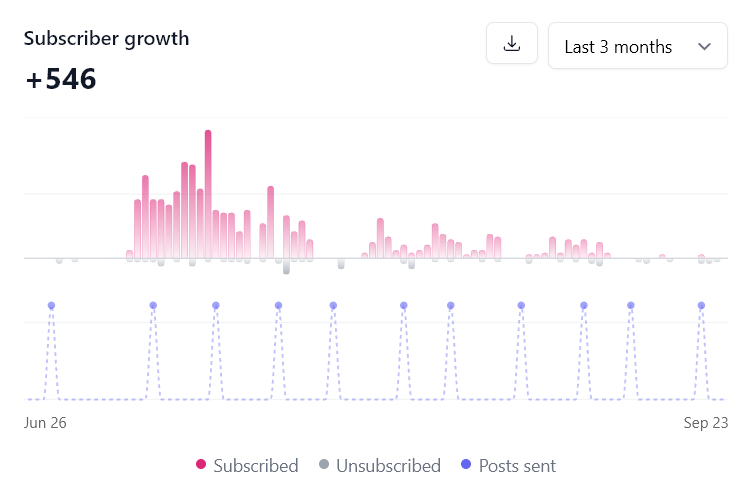
My newsletter grew by 546 subscribers in the three months to 23 September 2026, while Quibr posted every edition for me. It has 1,157 subscribers and no paid promotion behind it. beehiiv’s chart shows all growth, not growth by source, so it does not prove that Quibr caused all of it.
Subscriber growth for Notes to 10K MRR from 26 June to 23 September 2026, from beehiiv. The dots mark each edition sent.
What users say
“Been using Letterly lately and it's nice not having to think about that part anymore.”
What is the best social media tool for newsletter creators?
Quibr is the best pick if you want each edition turned into scheduled posts for X, LinkedIn, Threads and Facebook without writing them. Buffer is the best free scheduler if you write your own posts. Taplio is the best if you only post on LinkedIn.
How do I turn my newsletter into social media posts automatically?
Use a tool that reads your newsletter’s RSS feed, such as Quibr. It picks up each new edition, writes posts from it and schedules them across the week. You connect the feed and your accounts once, which takes about ten minutes.
What does a social media tool for newsletter creators cost?
On this list, entry plans run from $5 a month per channel (Buffer) to $39 a month (Taplio). Quibr is $29 a month for everything on four platforms. Quibr, Buffer, Typefully, Contentdrips and Letterfork have free plans.
How is Quibr different from Buffer or Typefully?
Buffer and Typefully publish posts you write. Quibr writes the posts from your newsletter, then schedules and publishes them. Typefully does not post to Facebook, and Buffer charges for each channel.
What newsletter platforms do these tools work with?
Quibr works with any newsletter that has an RSS feed, including beehiiv, Substack, Ghost, Kit and Mailchimp. Letterfork reads Substack, beehiiv and Ghost issues, and Buffer can show your newsletter’s latest editions through its RSS feed, though you write each post. Typefully, Hypefury and Taplio do not read your newsletter.
How long does it take to set up Quibr?
About ten minutes. You sign up, paste your RSS feed, connect your accounts and add a persona. After that, Quibr picks up each new edition within about half an hour of publishing.
How do I keep control of what gets posted?
Pick a tool with approval. Quibr has Manual, where you approve every post, and Light Touch, which gives you 1 to 24 hours to step in. Missinglettr waits for you to approve each new campaign.
What should I check before I buy a social media tool?
Check which platforms it publishes to today, whether it starts from your newsletter, whether you can approve posts first and how you cancel. Use the vendor’s own page, because prices and platforms change.
Try Quibr free (no credit card required)
You have seen how eight tools compare. The quickest way to judge Quibr is to read the posts it writes from your own newsletter. Signing up takes a minute and asks for no credit card.
Your free account includes one full agent run on your latest edition, so real posts arrive before you pay anything. Setup takes about ten minutes: paste your RSS feed, connect your accounts and add a persona. Create your free account and run your latest edition through Quibr.
Sources
Missinglettr pricingPlans, the free trial, the FAQ on approval, languages and platforms, and the 30,000+ figure. Read 13 October 2026.
Missinglettr homepageDrip campaigns and automatic content detection. Read 13 October 2026.
Contentdrips pricingPlans, AI credits and the 15 credits for a blog-to-carousel conversion. Read 13 October 2026.
Contentdrips homepageInputs, publishing to LinkedIn and Instagram, and the 5,000+ figure. Read 13 October 2026.
Letterfork homepageInputs, the seven platforms and the FAQ on auto-publishing. Read 13 October 2026.
The full Quibr test runThe settings, the posts and the screenshots behind the results section.
Quibr pricingThe plan, the trial and what is included.
About QuibrHow the agent works, the autonomy levels and the key facts.
What changed since the last update?
Moved Buffer from fifth to third. Its help centre describes content feeds that read an RSS feed, which this guide had missed, so Buffer now counts as starting from your newsletter and picking up each edition. Its channel list (now 12, with Substack) and its customer figures were read again on this date. Added a link to the new Quibr vs Buffer comparison.
First published. Every price, plan, platform list and customer count was read on the vendor’s own page on this date.