Quibr vs Buffer: which one should a newsletter creator use?
Choose Buffer if you write your own posts, want a free plan, or post to Instagram, TikTok or YouTube. Choose Quibr if you want each newsletter edition turned into posts for X, LinkedIn, Threads and Facebook without writing them. Buffer is a scheduler: it can show your newsletter’s latest editions through an RSS feed, but you write and queue every post. Quibr is an agent: it reads each new edition, writes the posts in your voice, schedules them across the week and publishes them, for $29 a month. I build Quibr, so weigh that, and check Buffer’s own pages, which I read on 15 October 2026.
Disclosure: I am Vicente Évora, the founder of Quibr (formerly Letterly). Every Buffer price, channel and feature here comes from Buffer’s own pages, read on 15 October 2026, and each one is linked in the sources. Buffer changes its plans from time to time, so check its pricing page on the day you decide.
What is the difference between Quibr and Buffer?
Buffer is a social media scheduler. You write a post, pick a time, and Buffer publishes it. Quibr is an AI social media agent for newsletter creators. It reads each new edition from your RSS feed, writes posts from it in your own voice, and schedules and publishes them across the week.
Buffer is the bigger and older company. It started as a project in November 2010, and on 15 October 2026 its about page listed 83,468 customers. Quibr was founded in November 2024 by one person, me, and more than 380 newsletter creators have signed up.
Quibr and Buffer side by side, read on 15 October 2026
Quibr
Buffer
What it is
An AI agent for newsletter creators
A scheduler for posts you write
Starts from
Each new edition in your RSS feed, picked up within about 30 minutes
Posts you write. Its content feeds show your newsletter’s latest articles when you open Buffer
Who writes the posts
Quibr, against posts you have already published, with a persona for each platform
You, with help from its AI Assistant if you want it
Publishes to
X, LinkedIn, Threads and Facebook Pages
12 channels, including X, LinkedIn, Threads, Facebook, Instagram, TikTok and YouTube
Price
$29 a month, one plan
Free for 3 channels, then $5 or $10 a month per channel
Free to try
A free plan with one full agent run, no card to sign up, and a seven-day trial
A free plan, and a 14-day trial of the paid plans
Control
Manual, Light Touch (a 1 to 24 hour window to step in) or Full Auto, with an emergency stop
Each post goes out when you schedule it
Can Buffer turn a newsletter into social posts?
Partly. Buffer’s content feeds can read your newsletter’s RSS feed. When you open a feed in Buffer’s Create space, it shows the feed’s latest articles, typically 10 to 20, and you press Create Post on one to start a post from it. The free plan allows 3 feeds and the paid plans 50.
From there, the writing is yours. Buffer’s help page on content feeds does not say that Buffer writes the post for you, and nothing in it says new items are posted on their own. Its AI Assistant, on every plan, helps you refine and repurpose a post you are working on.
Quibr does those steps without you. It checks your feed every 30 minutes, writes posts from each new edition, ten for X and five for LinkedIn by default, and spreads them across the following days.
How much do Quibr and Buffer cost?
Buffer charges per channel, and Quibr charges one flat price. For one to three channels, Buffer costs less. For all four of the platforms Quibr covers, Buffer’s Essentials plan comes to $20 a month and Quibr to $29 a month, with the writing done for you.
Monthly cost by number of channels, at monthly billing, from each pricing page on 15 October 2026
Channels
Buffer Free
Buffer Essentials
Buffer Team
Quibr
1
$0
$5 a month
$10 a month
$29 a month
2
$0
$10 a month
$20 a month
$29 a month
3
$0
$15 a month
$30 a month
$29 a month
4: X, LinkedIn, Threads and Facebook
Not possible: the free plan connects 3
$20 a month
$40 a month
$29 a month
Buffer’s free plan allows 10 scheduled posts per channel at a time. Its paid plans have a 14-day free trial, and its FAQ says annual billing costs less. Quibr is billed monthly with no contract, with a seven-day free trial and a free plan that includes one full agent run on your latest edition.
Which platforms do Quibr and Buffer post to?
Buffer covers more platforms. Its pricing page lists 12 channels: X, LinkedIn, Threads, Facebook, Instagram, TikTok, Bluesky, Mastodon, YouTube, Pinterest, Google Business Profile and Substack.
Quibr covers four: X, including X Communities, and LinkedIn, Threads and Facebook Pages. Threads reuses your X posts, and Facebook posts go to a Page, not a personal profile. If your readers are on Instagram, TikTok or YouTube, Quibr does not post there.
What does a week look like with each tool?
A week with Buffer
Send your edition
Your newsletter goes out as usual.
Open Buffer
Open the content feed that holds your newsletter and find the new edition.
Write each post
Press Create Post and write it, with the AI Assistant if you like. Repeat for every post and every channel.
Queue the posts
Pick a time for each one, and Buffer publishes them.
A week with Quibr
Send your edition
Your newsletter goes out as usual.
Quibr picks it up
Within about 30 minutes, from your RSS feed.
Quibr writes and schedules
Posts in your voice, spread across the following days.
You choose how much to check
Approve every post, step in during the window, or let them go. Quibr emails you when the run finishes.
When is Buffer the better choice?
Buffer is the better choice in these cases:
You enjoy writing your own posts and only want them scheduled.
Your readers are on Instagram, TikTok, YouTube or Pinterest, which Quibr does not post to.
You need one to three channels and want to pay little or nothing. The free plan connects 3.
A team shares one queue. Buffer’s Team plan includes unlimited team members.
Most of what you post does not come from your newsletter.
When is Quibr the better choice?
Quibr is the better choice in these cases:
You publish a newsletter every week and want each edition turned into posts without writing them.
Your readers are on X and LinkedIn, and maybe Threads and Facebook.
You want the posts to sound like you. Quibr writes against posts you have already published, with a persona for each platform.
You want to choose how much control to keep, from approving every post to full auto, with an emergency stop.
The trade-offs. Quibr has no Instagram, TikTok or YouTube, it needs a newsletter with an RSS feed to start from, and one person builds it.
Can you use Quibr and Buffer together?
Yes. They do different jobs. One way to split them: Quibr turns each edition into posts for X and LinkedIn, and Buffer schedules the posts you make by hand for Instagram or TikTok.
If one account ends up in both tools, keep an eye on how often it posts, so the two queues do not crowd it.
What does Quibr’s output look like?
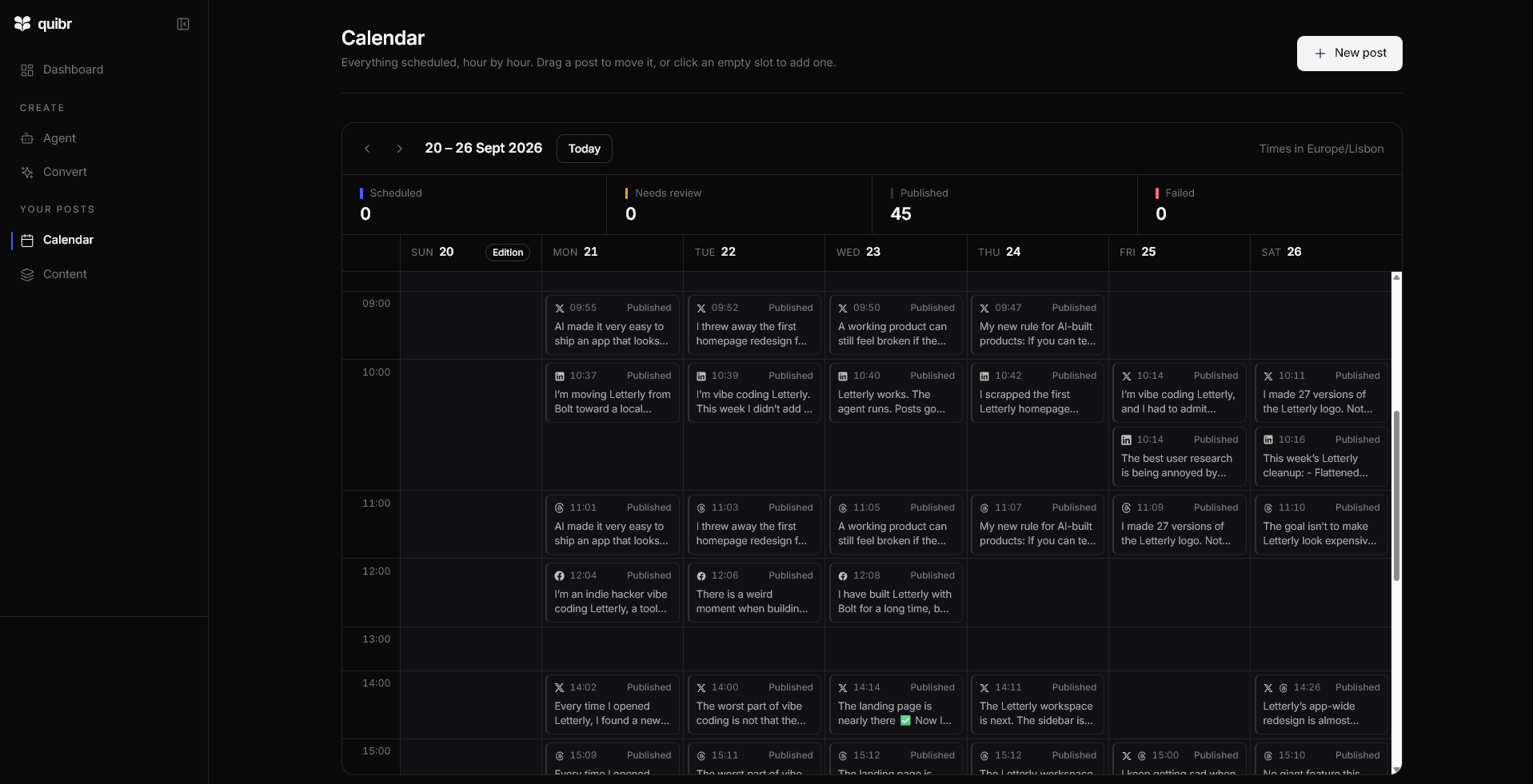
This is my own calendar for one week in September 2026, when Quibr was still called Letterly. It holds the posts the agent scheduled from one edition, across X, LinkedIn, Threads and Facebook, all published.
My Quibr calendar for 20 to 26 September 2026: 45 posts published from one edition. The posts mention Letterly because that was the name then.
“Been using Letterly lately and it's nice not having to think about that part anymore.”
For a measured example, the full test run shows the settings, the posts and what one edition brought back. To see how Buffer compares with seven other tools, read the buyer’s shortlist.
Frequently asked questions
Is Quibr a Buffer alternative?
For newsletter creators, yes. Buffer schedules posts you write, and Quibr writes the posts from your newsletter, then schedules and publishes them. If you mainly want to schedule posts you write yourself, Buffer is the simpler fit.
Can Buffer post my newsletter automatically?
Buffer’s content feeds can show your newsletter’s latest editions, but you create each post yourself. Its help page does not describe posting new feed items automatically.
Is Buffer cheaper than Quibr?
For one to three channels, yes: Buffer’s free plan connects 3, and Essentials is $5 a month per channel. For X, LinkedIn, Threads and Facebook together, Buffer Essentials is $20 a month and Quibr is $29, and Quibr writes the posts.
Does Quibr post to Instagram or TikTok?
No. Quibr posts to X, LinkedIn, Threads and Facebook Pages. Buffer covers Instagram, TikTok and YouTube.
Which newsletter platforms work with Quibr?
Any newsletter with an RSS feed, including beehiiv, Substack, Ghost, Kit and Mailchimp.
Can I approve posts before Quibr publishes them?
Yes. On Manual you approve every post, and on Light Touch you get a window of 1 to 24 hours to step in. Only Full Auto publishes without asking.
What changed since the last update?
First published. Every Buffer price, channel, feature and figure was read on Buffer’s own pages on this date.
Sources
Buffer pricingPlans per channel, the free plan, the trial, the channels and the AI Assistant. Read 15 October 2026.
Quibr pricingThe plan, the trial and what is included.
About QuibrHow the agent works, the autonomy levels and the key facts.
About the author
Vicente Évora
Founder of Quibr
Vicente writes Notes to 10K MRR, a weekly build-in-public newsletter on beehiiv, alongside university and a part-time job. Every edition went out on time, and the social posts that were supposed to follow it never did.
He built Quibr to write those posts for him. It started as an idea on 26 November 2024, and the first version shipped in January 2025. Quibr is built and run by one person, and Vicente answers support email himself.