Quibr vs Typefully: which one should a newsletter creator use?
Choose Typefully if you like writing your own posts and threads and want a polished editor, a free plan, and Bluesky, Mastodon or Substack. Choose Quibr if you want each newsletter edition turned into posts for X, LinkedIn, Threads and Facebook without writing them. Typefully is a writing and scheduling app: it has no built-in RSS reader, though its help shows a Zapier recipe that turns a feed item into a draft. Quibr is an agent that reads your feed, writes the posts in your voice and publishes them, for $29 a month. I build Quibr, so check Typefully’s pages, which I read on 27 October 2026.
Disclosure: I am Vicente Évora, the founder of Quibr. Every Typefully price, plan and feature here comes from Typefully’s own pages, read on 27 October 2026 and linked in the sources. Typefully’s prices are drawn on its page by script, so I read them in a browser.
What is the difference between Quibr and Typefully?
Typefully is a place to write and schedule social posts, with an editor built for threads and long posts and an AI writing assistant. You write, it publishes. Quibr is an AI agent for newsletter creators. It reads each new edition from your RSS feed, writes the posts from it in your voice, and schedules and publishes them.
Quibr and Typefully side by side, read on 27 October 2026
Quibr
Typefully
What it is
An AI agent for newsletter creators
A writing and scheduling app for social posts
Starts from
Each new edition in your RSS feed, picked up within about 30 minutes
What you write. No built-in RSS reader; a Zapier recipe can turn a feed item into a draft
Who writes the posts
Quibr, against posts you have already published
You, with its AI writing assistant
Publishes to
X, LinkedIn, Threads and Facebook Pages
X, Bluesky, LinkedIn, Threads, Mastodon and Substack
Price
$29 a month, one plan
Free (10 posts a month), Creator $99 a year, Business $18 a month per social set billed yearly
LinkedIn first comment
No
Yes
Control
Manual, Light Touch (a 1 to 24 hour window) or Full Auto, with an emergency stop
Each post goes out when you schedule it
Can Typefully turn a newsletter into social posts?
Not on its own. Typefully’s pricing page lists no RSS feature. Its help article on Zapier describes a recipe with three steps: a new item in an RSS feed, an OpenAI summary of it, then a Typefully draft. The result is a draft, not a published post, and it is one summary per item rather than several posts per edition.
Quibr does the whole job: it checks your feed every 30 minutes, writes several posts from each new edition, ten for X and five for LinkedIn by default, and spreads them across the following days.
How much do Quibr and Typefully cost?
Typefully costs less. Its Free plan allows 10 posts a month on one social set. Creator is $99 a year, billed annually only, for 1,000 posts a month. Business is $18 a month per social set, billed yearly, for teams. Quibr is $29 a month, billed monthly with no contract, after a seven-day free trial, and a free plan includes one full agent run.
The difference is the writing. With Typefully you pay less and write every post. With Quibr you pay more and the posts are written for you.
When is Typefully the better choice?
You enjoy writing your own posts and threads, and want a better editor than X’s.
You post to Bluesky, Mastodon or Substack, which Quibr does not.
You want a LinkedIn first comment, Auto-plug or X analytics.
A team writes together. Typefully’s Business plan has shared drafts, comments and permissions.
You post little, and its free plan of 10 posts a month is enough.
When is Quibr the better choice?
You publish a newsletter every week and want each edition turned into posts without writing them.
You post to Facebook Pages as well as X, LinkedIn and Threads.
You want to choose how much control to keep, from approving every post to full auto.
You want the call to action on X posted as a reply, and clicks counted per placement.
The trade-offs. Quibr has no Bluesky, Mastodon, Instagram or TikTok, it needs a newsletter with an RSS feed, and one person builds it.
What does Quibr’s output look like?
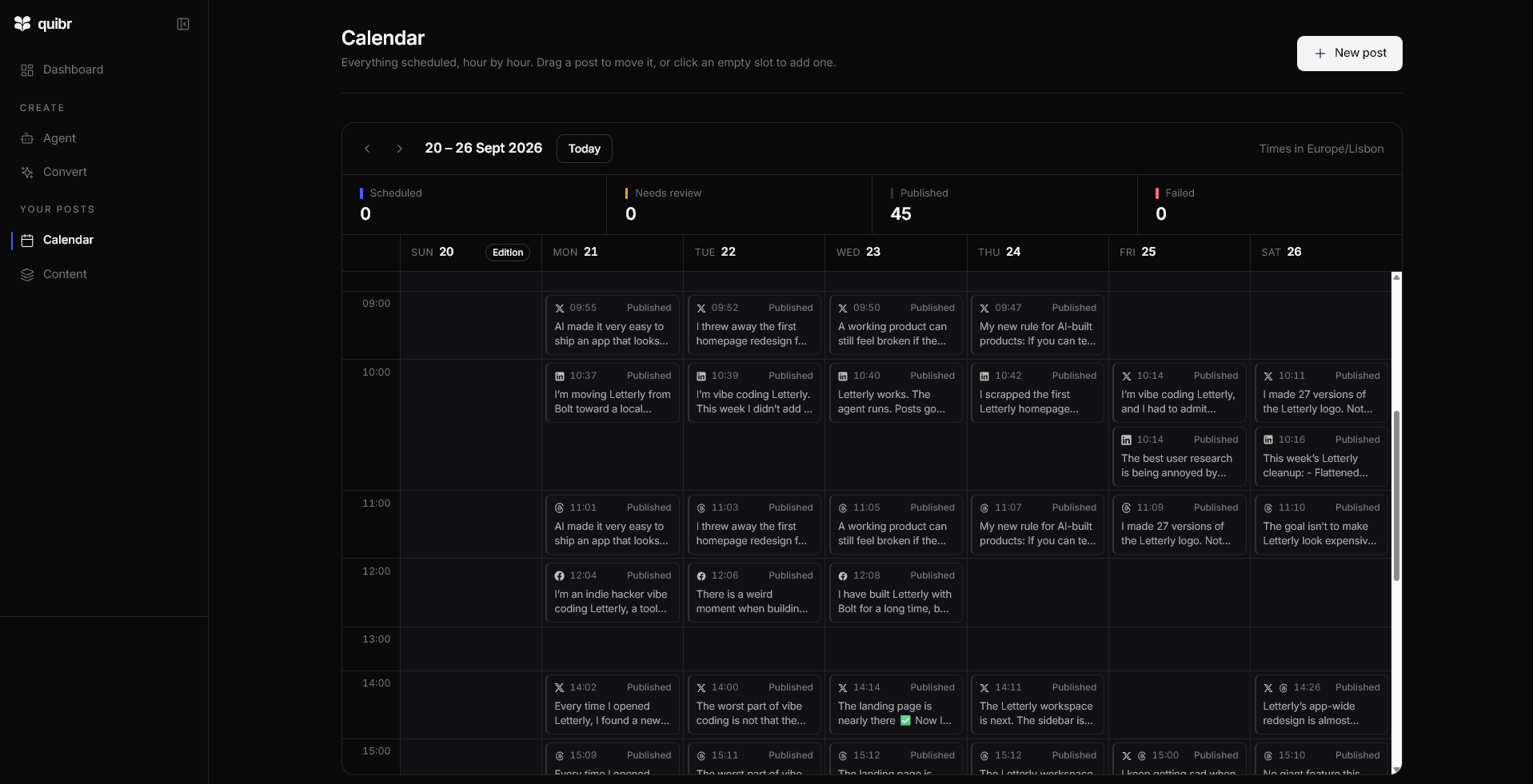
This is my own calendar for one week in September 2026, when Quibr was still called Letterly: the posts the agent scheduled from one edition, all published.
My Quibr calendar for 20 to 26 September 2026: 45 posts published from one edition. The posts mention Letterly because that was the name then.
“Been using Letterly lately and it's nice not having to think about that part anymore.”
For newsletter creators who do not want to write their posts, yes. Typefully helps you write and schedule. Quibr writes the posts from your newsletter and publishes them.
Can Typefully post my newsletter automatically?
Not on its own. Its help shows a Zapier recipe that summarises a new RSS item with OpenAI and creates a Typefully draft. Nothing is published without you.
Is Typefully cheaper than Quibr?
Yes. Typefully is free for 10 posts a month and $99 a year for Creator. Quibr is $29 a month, and it writes the posts.
Which platforms does Typefully post to?
X, Bluesky, LinkedIn, Threads, Mastodon and Substack, according to its pricing page. Quibr posts to X, LinkedIn, Threads and Facebook Pages.
Can I use Quibr and Typefully together?
Yes. Quibr can post newsletter posts on its own, and you can write extra threads or Bluesky posts in Typefully. Keep an eye on how often each account posts.
What changed since the last update?
First published. Every Typefully price, plan and feature was read on Typefully’s own pages on this date.
Sources
Typefully pricingPlans, prices, posting limits, platforms and features. Read 27 October 2026.
Vicente writes Notes to 10K MRR, a weekly build-in-public newsletter on beehiiv, alongside university and a part-time job. Every edition went out on time, and the social posts that were supposed to follow it never did.
He built Quibr to write those posts for him. It started as an idea on 26 November 2024, and the first version shipped in January 2025. Quibr is built and run by one person, and Vicente answers support email himself.