Quibr vs Hypefury: which one should a newsletter creator use?
Hypefury no longer supports X, so if your readers are on X, it is out: its own pricing page says so. Choose Hypefury if you write your own posts for LinkedIn, Threads, Bluesky, Instagram or TikTok and want automatic plugs and cross-posting, from $6 a month. Choose Quibr if you want each newsletter edition turned into posts for X, LinkedIn, Threads and Facebook without writing them, for $29 a month. Hypefury lists no RSS feature. I build Quibr, so check Hypefury’s page, which I read on 27 October 2026.
Disclosure: I am Vicente Évora, the founder of Quibr. Every Hypefury price, platform and feature here comes from Hypefury’s own features and pricing page, read on 27 October 2026 and linked in the sources.
What is the difference between Quibr and Hypefury?
Hypefury is a scheduling and growth tool for posts you write, with automatic plugs under posts that do well, auto-DMs on Instagram and cross-posting. Quibr is an AI agent for newsletter creators: it reads each new edition from your RSS feed, writes the posts in your voice, and publishes them.
Quibr and Hypefury side by side, read on 27 October 2026
Quibr
Hypefury
What it is
An AI agent for newsletter creators
A scheduler and growth tool for posts you write
Starts from
Each new edition in your RSS feed
What you write. No RSS feature listed
X
Yes, including X Communities
No. Its FAQ says it no longer supports X
Other platforms
LinkedIn, Threads and Facebook Pages
Bluesky, Threads, LinkedIn, Instagram and TikTok
Price
$29 a month, one plan
Flexible $6 a month per platform, or Full $19 a month for all
Free to try
A free plan with one agent run, and a seven-day trial
A seven-day trial with no card. No free plan
Does Hypefury still support X?
No. Its pricing page FAQ asks whether Hypefury still supports X and answers that it no longer does. For a newsletter writer, that matters: Newsletter Operator names LinkedIn and X as the two platforms that suit most newsletters.
If X is where your readers are, Quibr writes and publishes X posts from each edition, and posts the call to action as a reply, because X limits the reach of posts with an outside link, according to Social Media Today.
How much do Quibr and Hypefury cost?
Hypefury’s Flexible plan is $6 a month for one platform, with $6 a month for each extra platform. Its Full plan is $19 a month with every platform it supports. Both have a seven-day free trial with no card, and there is no free plan. Quibr is $29 a month for everything, after a seven-day free trial, with a free plan that includes one full agent run.
Hypefury costs less, and you write every post. Quibr costs more, and it writes them.
When is Hypefury the better choice?
You write your own posts and want them cross-posted to Bluesky, Threads, LinkedIn, Instagram and TikTok.
You want Autoplugs under posts that do well, or auto-DMs on Instagram.
Your readers are on Instagram or TikTok, which Quibr does not post to.
You post to one platform and want to pay $6 a month.
When is Quibr the better choice?
Your readers are on X.
You want each newsletter edition turned into posts without writing them.
You post to Facebook Pages.
You want to approve posts, step in during a window, or let them go on their own.
The trade-offs. Quibr has no Bluesky, Instagram or TikTok, it needs a newsletter with an RSS feed, and one person builds it.
What does Quibr’s output look like?
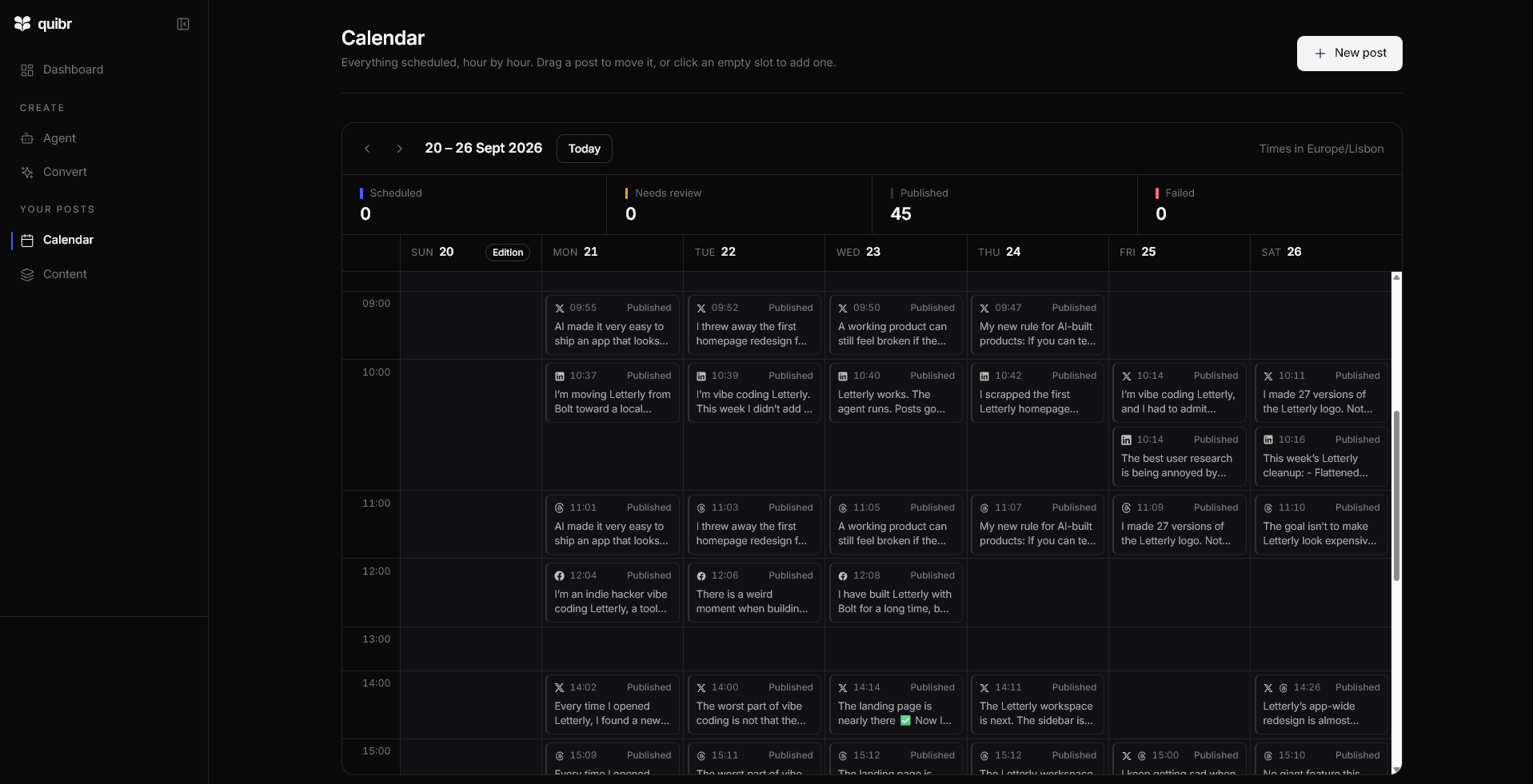
My Quibr calendar for 20 to 26 September 2026: 45 posts published from one edition. The posts mention Letterly because that was the name then.
“Been using Letterly lately and it's nice not having to think about that part anymore.”
No. Hypefury’s own FAQ says it no longer supports X. Quibr posts to X, LinkedIn, Threads and Facebook Pages.
Is Quibr a Hypefury alternative?
For newsletter creators on X or LinkedIn who do not want to write their posts, yes. For writers who post their own content to Instagram, TikTok or Bluesky, Hypefury fits better.
How much does Hypefury cost?
$6 a month for one platform, plus $6 for each extra one, or $19 a month for all its platforms, with a seven-day free trial and no free plan.
Can Hypefury post my newsletter automatically?
Its pricing page lists no RSS or newsletter import, so you write each post. Quibr reads your newsletter’s RSS feed and writes the posts.
Can I use Quibr and Hypefury together?
Yes. Quibr can post your newsletter to X, LinkedIn, Threads and Facebook, and Hypefury can schedule the posts you write for Instagram, TikTok or Bluesky. Watch how often each account posts if both tools use it.
What changed since the last update?
First published. Every Hypefury price, platform and feature was read on Hypefury’s own page on this date.
Quibr pricingThe plan, the trial and what is included.
About the author
Vicente Évora
Founder of Quibr
Vicente writes Notes to 10K MRR, a weekly build-in-public newsletter on beehiiv, alongside university and a part-time job. Every edition went out on time, and the social posts that were supposed to follow it never did.
He built Quibr to write those posts for him. It started as an idea on 26 November 2024, and the first version shipped in January 2025. Quibr is built and run by one person, and Vicente answers support email himself.